/
Configuring Data Retention for Deleted Records
Choose what happens to deleted records in Dermi Atlas Professional and how long they stay recoverable, with the deletion and retention settings in Atlas Manager.
Updated September 29, 20264 min read
Two settings in Dermi Atlas Manager decide what happens when a patient, entry, image, zone, full body session, or lesion is deleted in Dermi Atlas Professional:
- Data Deletion Policy: whether deleted records are kept and recoverable, and whether their activity logs are kept with them
- Data Retention Period: how long kept records stay recoverable before they are removed for good
Both apply to deletions by every member of the team. They are set under Administration in Atlas Manager, on the computer that hosts Atlas, which is unlocked with the admin passphrase; see Atlas Manager Administration.
Data Deletion Policy
The Data Deletion Policy card offers three policies:
- Recoverable: Deleted records, files, and their activity logs are kept for the retention period.
- Standard: Deleted records and files are kept for the retention period; their activity logs are removed.
- Permanent: Deleted records, files, and their activity logs are removed immediately.
Standard is the default. Recoverable and Standard both keep deleted records and their photographs for the retention period, so a Clinician can restore them during that time; they differ only in whether the activity logs of the deleted records are kept. Under Permanent, nothing can be restored after a deletion.
A policy applies to deletions made after it is set. Records deleted earlier keep the outcome of the policy that applied when they were deleted.
In the Atlas Cloud Demo, deleted records are removed immediately.
Data Retention Period
The Data Retention Period card sets, in months, how long deleted records stay recoverable under the Recoverable and Standard policies. The default is 120 months (10 years), and the period can be set from 1 to 600 months. The card shows the value in years and months as well, for example "2 years, 3 months".
The period covers deleted patients, entries, images, zones, full body sessions, and lesions, the activity logs kept with them, and the account history of deleted team member accounts. Each record's period runs from the date it was deleted.
When the period ends, the record and its photographs are removed automatically at the next daily cleanup and cannot be restored afterwards.
Change the Settings
- Open Dermi Atlas Manager on the computer that hosts Atlas.
- Open Administration and enter the admin passphrase.
- Under Settings, select a policy in the Data Deletion Policy card, or enter a number of months in the Data Retention Period card.
- Select Apply Changes (Apply in a narrow window).
Changing the Retention Period
A longer or shorter period applies to deleted patients, entries, and images already waiting, measured from each one's deletion date. Deleted zones, full body sessions, and lesions keep the period that applied when they were deleted.
Shortening the period asks for confirmation first: type REDUCE RETENTION PERIOD and select Reduce Retention Period. Records already past the new period are removed at the next daily cleanup and cannot be restored.
For example, a patient deleted on January 1, 2026 under the 120-month default can be restored until January 1, 2036. If the period is reduced to 6 months, that patient's period ends on July 1, 2026, and once that date has passed the patient is removed at the next daily cleanup.
To remove specific deleted records before their period ends without changing the period for everyone, contact Dermi support.
Where Deleted Records Appear
While a record is recoverable, Clinician accounts see it in Atlas with a countdown to its removal: deleted patients on the Deleted Records page, and individually deleted entries, images, zones, sessions, and lesions in the Deleted Items drawer of the patient. Restoring them is covered in Recovering Deleted Records.
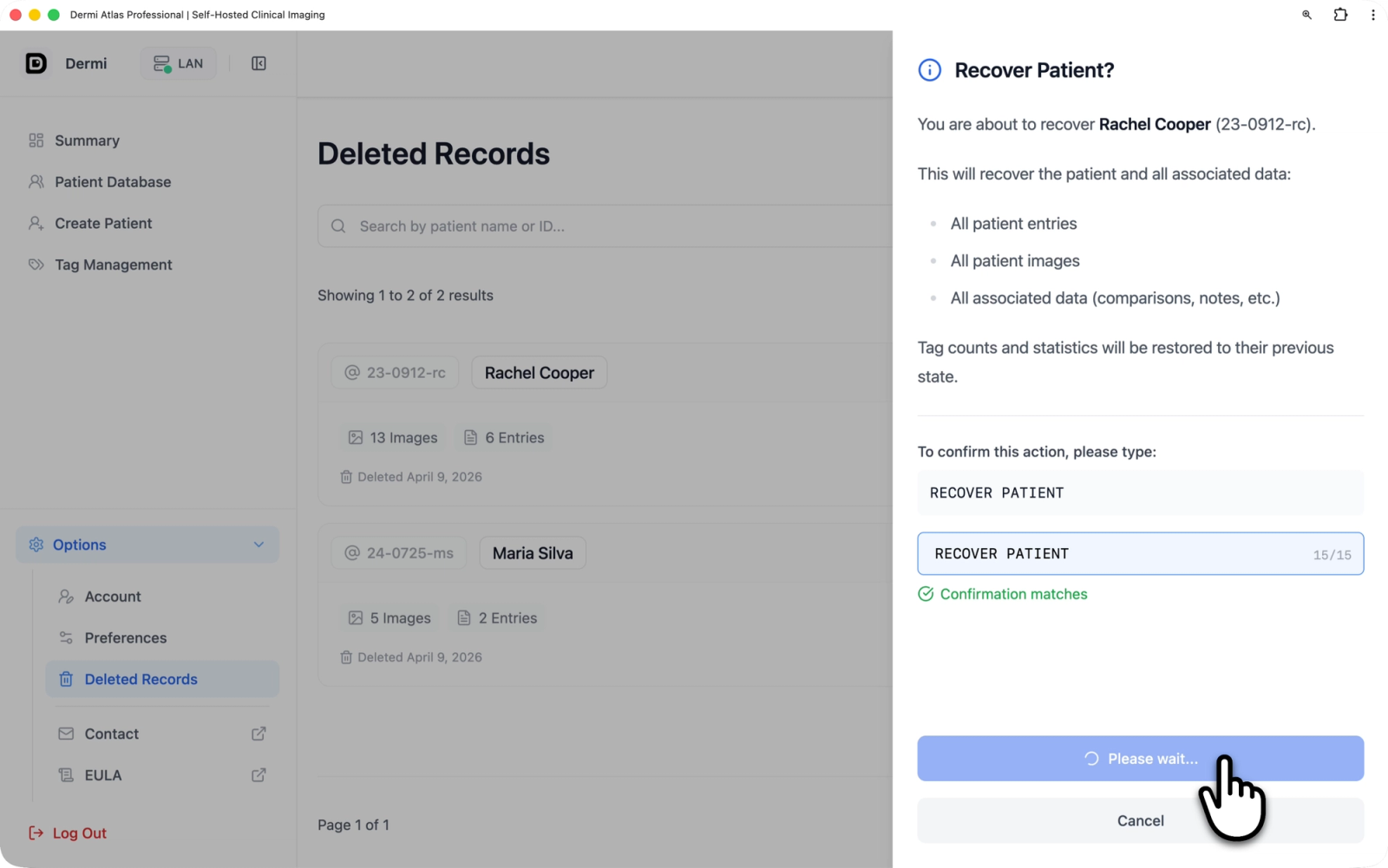
Illustrative demo with synthetic data. Learn more
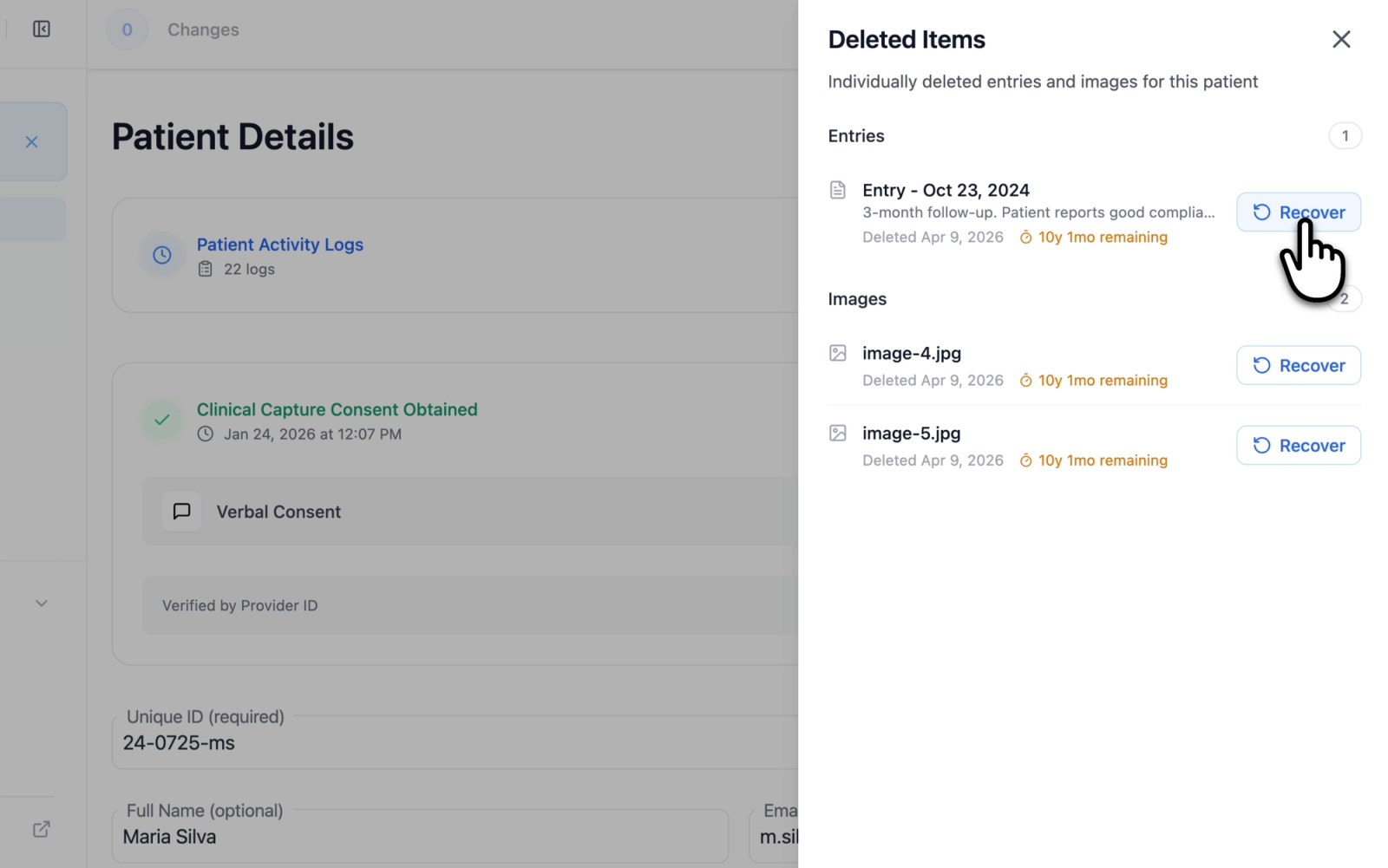
Illustrative demo with synthetic data. Learn more
Choosing a Retention Period
Minimum retention periods for medical records are set by regulation and by practice policy, and they differ between jurisdictions. The period is set to match the practice's obligations, with its compliance officer or legal counsel where needed; the security and compliance guides cover the regulations Atlas is designed to support.
Related Resources
- Recovering Deleted Records for restoring deleted patients and items
- Audit Logging Configuration for the activity levels and the logs a policy keeps or removes
- Atlas Manager Administration for the admin passphrase and the Deployment Purge
Was this article helpful?
Your feedback helps improve the documentation
Still have questions?
Typical response within 24 hours.
Synthetic Data Notice
All demonstrations, screenshots, and media on this page use synthetic data only. No real patient information is shown.
The following are synthetic and do not correspond to real patients:
- All human faces and individuals are synthetic and do not represent real people
- All clinical and medical images, including photographs and scans, are synthetic or simulated
- All patient names, dates, identifiers, and other details are fictional
- All clinical notes and documentation are sample content for demonstration only
Media is provided solely to illustrate platform functionality and workflows.