Dermi AtlasEvery visit, documented.
Organization, comparisons, and data location
Practice-defined tags
Tags for conditions, body locations, and treatment phases, with photographs grouped by the date each was taken.
Split and overlay views
Side-by-side and overlay comparisons line up automatically, and their layout, order, and opacity are saved.
Photos kept in the practice
Photographs and patient records are stored on computers the practice owns, not in a vendor cloud.
Search and filter
Find patients by name, unique ID, notes, or tag, then narrow the list with filters.
Tag categories
Color-coded tag categories the practice defines, applied to patients, entries, and images.
Feature comparison
EMR photo tab
Phone and shared albums
Atlas Professional
EMR photo tab
Phone and shared albums
Atlas Professional
EMR photo tab
Phone and shared albums
Atlas Professional
EMR photo tab
Phone and shared albums
Atlas Professional
EMR photo tab
Phone and shared albums
Atlas Professional
EMR photo tab
Phone and shared albums
Atlas Professional
Records, comparisons, annotations, and exports
Patient Management
Find patients by thumbnail, name, or ID, and create a record from the search.
Visual patient search
Illustrative demo with synthetic data. Learn more
- Thumbnail search for picking out the right patient
- New records with an ID suggested from the search
- PDFs of details, the Image Pool, or the full record
- Letter-size PDFs for printing or adding to an EMR
- An activity log for every patient record
Image Pool
Each patient's photographs, grouped by the date taken, with captions and tags.
Drag-and-drop upload
Illustrative demo with synthetic data. Learn more
- One photo or many at once, grouped by the date taken
- Captions, tags, rotation, download, and deletion
- Card and list views, both ordered by date
- The whole Image Pool exported as a formatted PDF
- An editable Effective Date on every photograph
Zones
Photographs grouped by body area, each zone with an overview image and its dermoscopy.
Create a zone
Illustrative demo with synthetic data. Learn more
- Zone cards group a visit's photographs by body area
- A primary overview image fronts each zone
- Dermoscopy beside the overview, one date at a time
- Tag filters extend to zone and session cards
- Zone membership kept through recoverable deletion
Entry Workspace
A self-contained record of selected images, clinical notes, tags, and comparisons.
Start a clinical entry
Illustrative demo with synthetic data. Learn more
- Images selected from the Image Pool
- Clinical notes and tags that save automatically
- Several comparisons within a single entry
- The whole entry exported as a formatted PDF
- A separate comparison history for each entry
Split Comparisons
Grid, vertical, and horizontal layouts for any set of visits, with one-click alignment.
Side-by-side comparison
Illustrative demo with synthetic data. Learn more
- One-click automatic alignment across the whole layout
- View, Arrange, and Annotate modes keep gestures apart
- Adjustable image order and comparison captions
- Export through Custom Export or one-tap Quick Export
- Undo, redo, and a saved layout for every comparison
Overlay Comparisons
Layered images with per-layer opacity and positioning, and one-click alignment.
Opacity blending
Illustrative demo with synthetic data. Learn more
- Independent opacity adjustment for each image layer
- Automatic alignment, then fine positioning by hand
- Stacking order and layer visibility set per layer
- Opacity, order, and position saved automatically
- Export through Custom Export or one-tap Quick Export
Image Filters
Reversible filters for reading redness, pigmentation, and texture in any image.
Erythema and strength
Illustrative demo with synthetic data. Learn more
- Live previews of each filter, from the current image
- Adjustable strength while the canvas pans and zooms
- One filter on one scale across a whole comparison
- In the viewer, comparisons, Full Body, and Zone Review
- Stored photograph unchanged; exports name the filter
Annotations
Markup drawn on the photograph, anchored to it, and live on every device.
Draw on the image
Illustrative demo with synthetic data. Learn more
- Arrow, shape, freehand, text, and pin tools
- Anchored through zoom, pan, alignment, and rotation
- Colleagues mark up the same image at the same time
- Markup shown on thumbnails, or hidden in one tap
- Apple Pencil input that ignores a resting palm
Full Body Photography
Total body photography in sessions, with pose capture, lesion records, and compare.
Sessions at a glance
Illustrative demo with synthetic data. Learn more
- Capture steps through a pose set with coverage progress
- Review pins lesions beside a lesion detail panel
- Dermoscopy linked to each lesion for close-up context
- Compare lines up prior sessions to follow a lesion
- Lesion sites prefill from each pose's anatomical term
Real-Time Sync
Colleagues work in the same record at once, each shown by name where they are working.
Session handoff
Illustrative demo with synthetic data. Learn more
- Colleagues write notes, captions, and details at once
- Colleagues named on the cards and rows they have open
- A colleague's caret shown inside a shared note
- Pointer, drafts, and saved marks appear as they draw
- Quick navigation to a session open on another device
Live Pointer
A transient pointer for co-review, drawn live on the image while you talk a patient through it.
Live Pointer, shared
Illustrative demo with synthetic data. Learn more
- Draw on images and comparisons to point out an area
- Marks fade within seconds and never change the record
- Built for consultations on shared screens
- In the viewer, both comparisons, and review canvases
- A colleague's strokes appear on every open screen
Team Accounts
One patient record for the whole practice, with a named login for every person.
Claim an invitation
Illustrative demo with synthetic data. Learn more
- Every member sees every patient of the team
- Clinicians alone export, delete, and recover
- Invitations from the Dermi Portal, claimed with a code
- Assign Members drives the My Patients view
- Actions recorded under the account that performed them
Tagging System
A practice-defined tag library, color-coded and applied across the whole record.
Create tags
Illustrative demo with synthetic data. Learn more
- Custom tags in color-coded tag categories
- Tags on images, patients, and clinical entries
- Image tags inherited by the patient record
- Suggestions from the library, set per category
- Bulk CSV import and export of the tag library
Search and Filters
Search by name, ID, or tag, and filter by date, attribute, and member.
Combine tag filters
Illustrative demo with synthetic data. Learn more
- Text search across patient names and identifiers
- Date range filtering for appointment windows
- Tag filters that combine several tags
- Filters for records with entries or images
- Member filters for each person's assigned patients
Consent Management
Consent recorded on the patient, enforced at the level each account sets.
Set enforcement mode
Illustrative demo with synthetic data. Learn more
- Enforcement from advisory to required before upload
- Digital consent with the patient's typed name
- Verbal, written, or other methods recorded with notes
- Revocation and re-consent behind a typed confirmation
- Consent actions recorded in the patient's activity log
Custom Export
Framed, themed, dated, and branded exports in a live preview, with the original unchanged.
Framed export
Illustrative demo with synthetic data. Learn more
- A full-screen live preview before the file is saved
- Square, portrait, story, wide, and original frames
- Themes, date labels, and practice logo placement
- Quick Export of the on-screen comparison in one tap
- Originals untouched; exports carry no camera metadata
Alignment in split and overlay views
Photographs taken at different visits and magnifications line up in one click.
Overlay alignment
Split alignment
Multi-scale split
Multi-scale overlay
Overlay layers line up in one click, ready to compare by opacity across visits.
Illustrative demo with synthetic data. Learn more
Anatomy matching
Atlas matches the same anatomy across photographs so the images line up.
Both comparison modes
Available in every split layout and in overlay comparisons with opacity control.
One-click activation
One button aligns the whole comparison, and the original positions can be restored.
Aligned on-premises
Alignment runs on the computer that hosts Atlas, inside the practice network.
Clinical workflows, step by step
Patient Setup
Search for the patient, or create a record with a suggested ID
Open Image Pool and upload one photo or many at once
Add tags and captions during or after the upload
Photographs are grouped by the date each was taken
A patient record with organized, searchable photographs
Autosaved edits
Entry and image edits save as you work.
Saved comparisons
Layout, position, and opacity are kept.
Live on every device
Every signed-in device shows the current record.
Interface, devices, and change control
Thumbnails throughout
Photograph thumbnails beside patients, entries, and search results make records quick to recognize.
Phone, tablet, and desktop
The same workspace at every screen size, installable as a Progressive Web App (PWA).
Account preferences
Configure default sort orders, consent enforcement, image rendering, and default views.
Unsaved changes shown
Unsaved fields stay marked, and navigation waits until changes are saved or discarded.
Keep working while edits save
Field-by-field change control
Live on every open device
The same workspace on any screen
All entry and image edits save automatically
Illustrative demo with synthetic data. Learn more
Photo capture on iPhone and iPad
Reference overlay
A live overlay of the prior photograph guides each follow-up into matching framing.
Sent to the record
Photographs go straight to the patient record on the practice network, not to the camera roll.
iPhone and iPad
Capture with the native camera, then continue in the Atlas workspace on the same device.

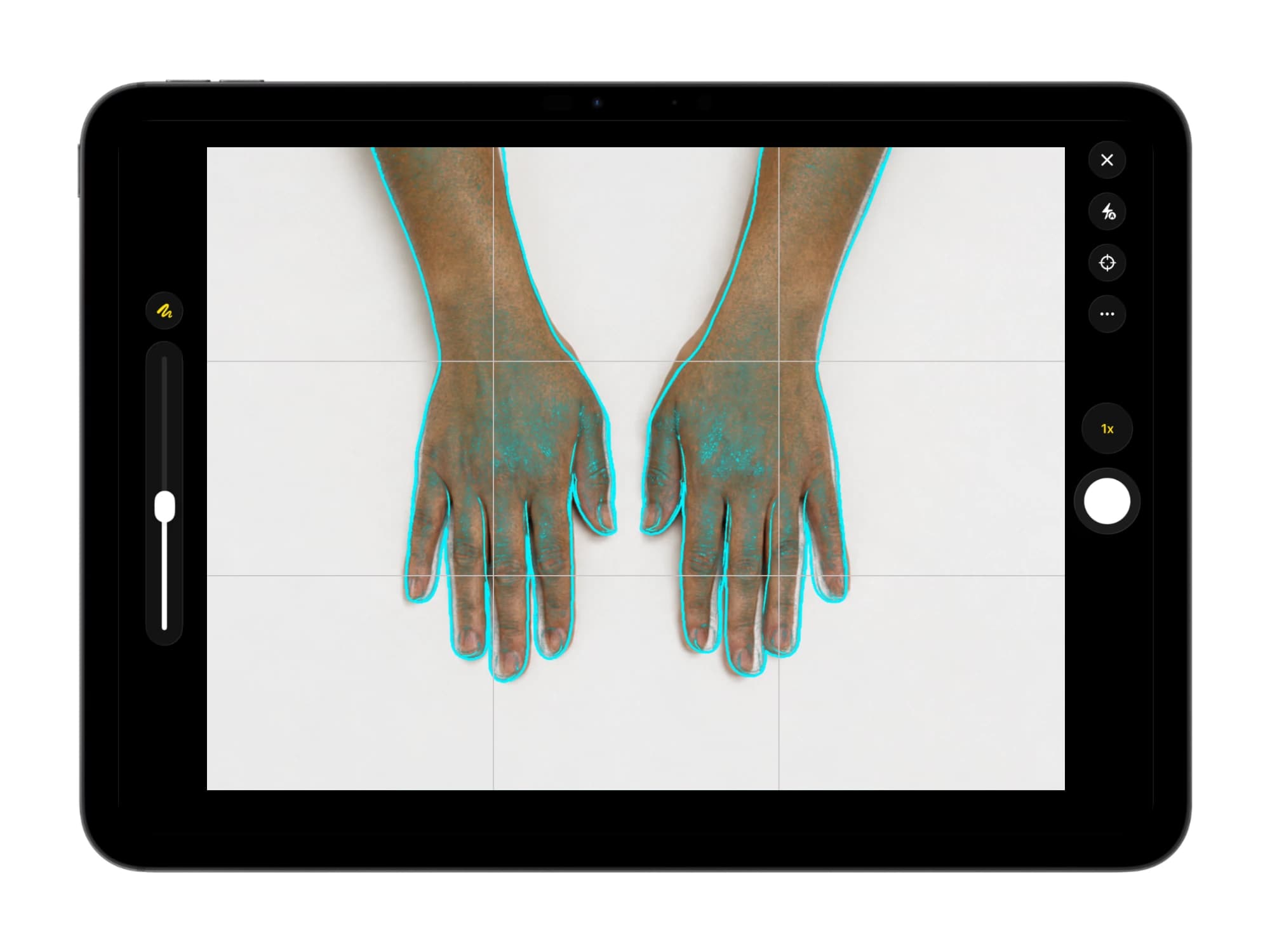
Illustrative demo with synthetic data. Learn more
One patient list, a login for every person
One shared patient record
Every clinical record on a deployment belongs to the practice's team, and every member sees every patient.
A login for every person
Each person keeps their own username, password, and optional two-factor authentication, and actions are recorded under their account.
Assignment and live sessions
Assign patients to members, open the list to My Patients or All Patients, and see who has an entry open.
Both account types
- Capture and image upload
- Entries, notes, and lesions
- Annotations and comparisons
- New patients and assignment
Only Clinician accounts
- PDF reports and image export
- Changes to patient details
- Deletion of patients and images
- Recovery of deleted records
Default view
Member filter
Assign Members
Session pill
Shared captions
Assistants open on All Patients, Clinicians on My Patients.
Illustrative demo with synthetic data. Learn more
Access, encryption, data protection, and audit logging
HTTPS on the network
HTTPS and WSS addresses with a self-signed certificate.
Practice network only
Patient photographs and records never leave the practice network.
Two-factor sign-in
Named accounts with QR setup and recovery codes.
Activity logs per patient
Actions recorded by account, at the level the practice sets.
Account security
Password and two-factor changes, confirmed by a single-use verification link.
Named team accounts
- Each account claimed from a Dermi Portal invitation
- Two-factor sign-in by QR code or manual key
- Recovery codes saved as a downloadable file
Verification links
- Single-use links confirm sensitive account changes
- Email addresses changed by the owner in Dermi Portal
- Links shown in Atlas Manager without outgoing email
HTTPS certificates
- HTTPS and WSS addresses on the practice network
- A self-signed certificate set up by Atlas Manager
- Certificates downloaded and rotated in Atlas Manager
Local network access
- Atlas is reached only from the practice network
- Daily work continues when the internet is down
- Licensing and updates checked over the internet
Typed confirmations
- Explicit confirmation required for all deletions
- A typed phrase before any permanent deletion
- Applies to images, entries, and patient records
Deletion policies
- A deletion policy the practice sets for its records
- Recoverable deletion kept for a set retention period
- Permanent deletion removes files and audit records
Patient activity logs
- A logging level the practice configures
- Each action logged with its account and time
- One activity log per patient, shared by the team
Export activity logs
- Exports logged under the account that made them
- PDF reports, image downloads, and comparison exports
- An export purpose recorded with composed images
Deployment and backups
Runs on your computers
Atlas Professional runs on a server or workstation the practice already owns; no new hardware is required.
Backups and restores
Backups of every patient record and image, verified for integrity and restored from Atlas Manager.
- Self-signed certificate
- Practice network only
Dermi Atlas Manager
The desktop app that installs, updates, and backs up Dermi Atlas
Questions and answers
Open Dermi Atlas in a web browser on any device connected to the practice network. Atlas Manager shows the HTTPS address, secured with a self-signed certificate it sets up, and Dermi Atlas can also be installed on a device as a Progressive Web App (PWA).
Yes. Dermi Atlas runs in a modern browser on phones, tablets, and desktop computers on the practice network, with a layout that adapts to each screen. On iPhone and iPad, the Dermi Atlas Companion app adds native camera capture framed against the prior photograph and opens the full workspace.
Yes. After deployment, patient records, image uploads, comparisons, annotations, and exports all work on the practice network when the internet is down. Licensing, updates, team invitations, and account emails need an internet connection.
Yes. Every clinical record on a deployment belongs to the practice's team, and every member works from the same patient list under their own login, with optional two-factor authentication. Patients can be assigned to members, and each person's list can open on My Patients or All Patients.
Both account types capture images, create patients, add entries and notes, annotate, compare, and search the shared patient list. Clinician accounts also export, delete and recover records, edit patient details, and download originals. The type is chosen at invitation and can be changed in the Dermi Portal.
The license owner invites a member from the Dermi Portal by email address and account type. The member receives a single-use claim code, opens the Atlas sign-in page on the practice network, chooses Claim invitation, and sets a username, name, and password.
Each patient's photographs go into their Image Pool, grouped by the date each photograph was taken, in card or list view. Photographs carry captions and tags for condition, body location, and treatment phase, keep their original quality, and can be selected into entries for comparisons and notes.
Dermi Atlas keeps the clinical photograph as captured. Images can be rotated, and image filters change only how a photograph is viewed, never the stored file. Any other editing is done before upload, which keeps the provenance of each clinical photograph clear.
Pressing the align button in a split or overlay comparison matches the same anatomy across the photographs so the images line up, including photographs taken at different magnifications. Alignment runs on the practice's own computers, the original positions can be restored, and the aligned state is saved with the comparison.
The Image Pool is a patient's complete photo archive, where every image is uploaded and organized by date. An entry is a focused documentation unit: selected images from the pool, split or overlay comparisons, clinical notes, and tags, exportable as a formatted PDF report.
Clinician accounts download individual images at full quality, with or without annotations. Comparisons and images export through Custom Export or Quick Export, and entries, Image Pools, patient details, and complete reports export as letter-size PDFs, so records can be archived or moved at any time.
Each account sets its consent enforcement on its Preferences page: Disabled, Advisory, or Required, where Required blocks uploads for a patient until consent is recorded. Consent is recorded digitally with the patient's typed name or as verbal, written, or other methods with notes, and revocations are logged.
Yes. Dermoscopy photographs are uploaded to a patient's Image Pool beside clinical images, tagged by body location and condition, and compared in split and overlay views. Zones keep each body area's dermoscopy beside its overview image, and full body lesion records link their close-ups.
Clinicians follow treatment progress through photographs grouped by the date taken and tagged by condition, body location, and treatment phase. Selected visits go into an entry, where aligned split and overlay comparisons show each visit side by side, and the comparison layout is saved for the next review.
Dermi Atlas is built by Dermi Inc., an independent software company headquartered in Toronto, Canada. Med spas, aesthetic clinics, plastic surgery, and dermatology practices use it to document skin conditions and track treatment progress with photography, with support and assisted setup provided by the Dermi team.
Plans, pricing, and free trial
Dermi Atlas Professional
- Base plan per deployment
- First 30 days free
- Additional clinician seat$59 USD / month
- Additional assistant seat$12 USD / month
- Every feature, with real patient records
- Runs on computers the practice already owns
- Technical support at no extra charge
Atlas Cloud Demo
- No time limit
- No credit card
- Nearly every feature, with photos you upload
- Runs in a browser, nothing to install
- A free Dermi Cloud Services account to sign in
Synthetic Data Notice
All demonstrations, screenshots, and media on this page use synthetic data only. No real patient information is shown.
The following are synthetic and do not correspond to real patients:
- All human faces and individuals are synthetic and do not represent real people
- All clinical and medical images, including photographs and scans, are synthetic or simulated
- All patient names, dates, identifiers, and other details are fictional
- All clinical notes and documentation are sample content for demonstration only
Media is provided solely to illustrate platform functionality and workflows.